Every clip goes to the right account
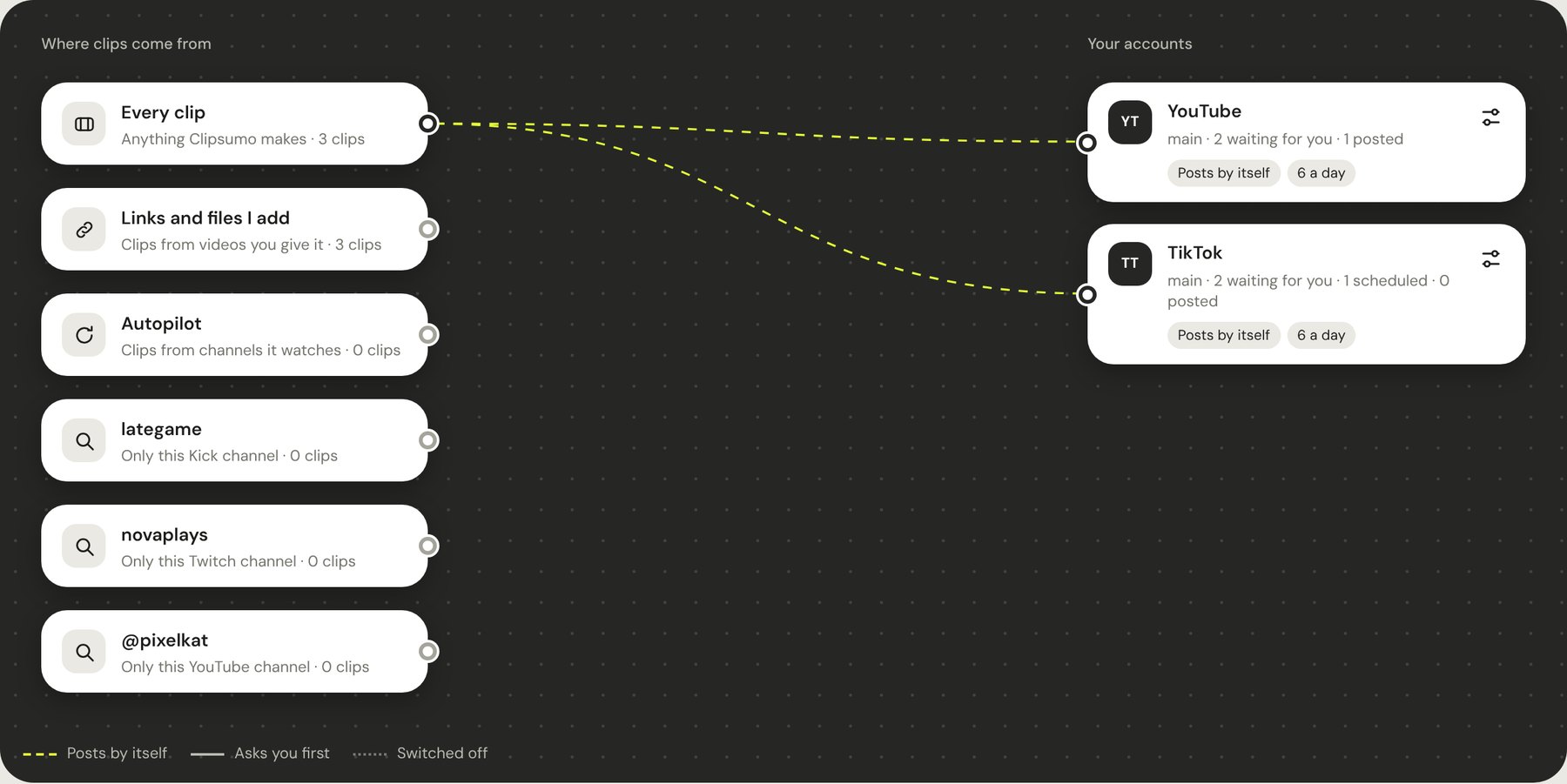
Draw a line from a channel to an account. Clipsumo spaces the posts through the day, and you can approve each one or let it run.
Paste a link tonight. Wake up to captioned clips, ready to post.
Clipsumo finds the best moments in a long video and cuts them into vertical clips for Shorts, TikTok and Reels. It runs on your own computer.
Free trial: 10 clips. No card. No account. Windows and Mac.
 ClipsumoChat lost it0:38One more game0:31
of people in a US survey said they watch videos on their phone with the sound off. Four in five said they are more likely to finish a video that has captions.
Every Clipsumo clip comes captioned.
Source: Verizon Media and Publicis Media, survey of more than 5,600 US viewers, 2019.
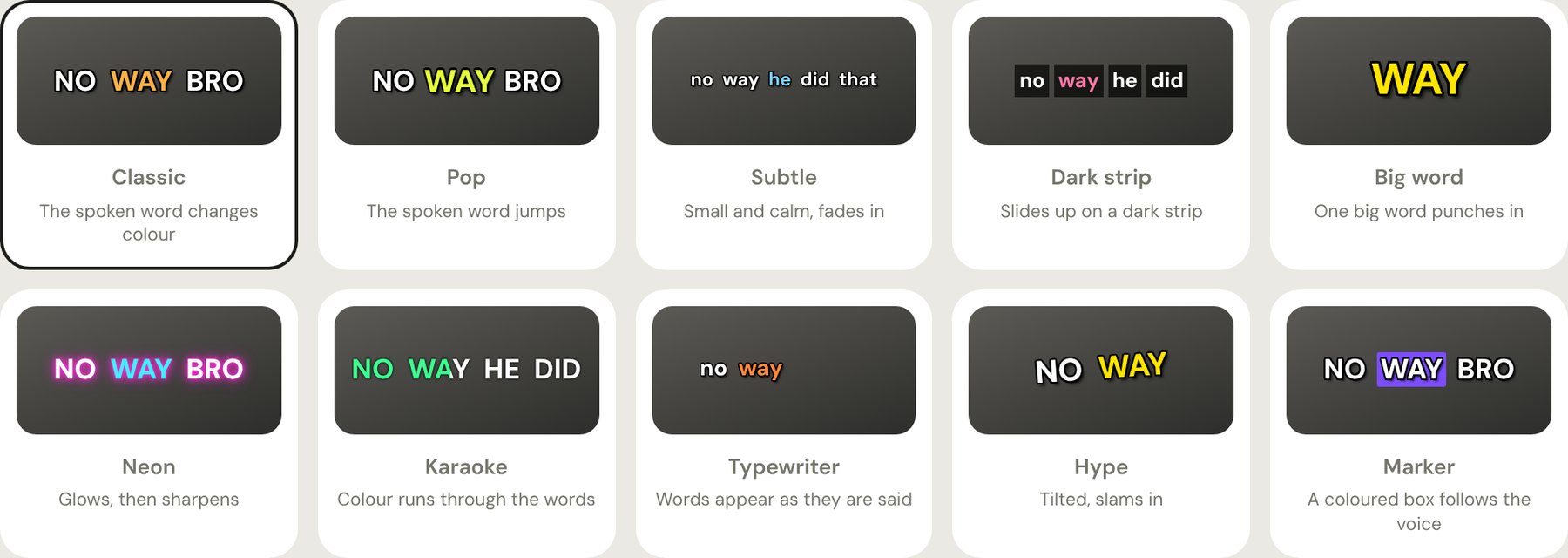
Every clip gets word-by-word captions and a title. Tap a style to see it move.
Ten caption styles and six title styles come with the app. You choose the font, the size, and where the streamer's camera sits in the frame.
Clipsumo also finds the videos, fixes the clips and posts them.
Draw a line from a channel to an account. Clipsumo spaces the posts through the day, and you can approve each one or let it run.
It watches the channels you list and clips new videos by itself, even with the window closed.
Move the start or the end, correct a word, and make it again without starting over.
One switch strips the background music from a clip and keeps what was said.
Translate the captions before they are burned in, to reach viewers who speak something else.
With an NVIDIA card, listening to a long video takes much less time. Clipsumo tests the card first and falls back if it fails.
The AI runs on your computer, so there is no bill per video and nothing leaves your machine unless you post it.
Paste a YouTube, Twitch or Kick link, or drop in a file from your computer.
Speech becomes text, and an AI model scores the moments. You can also set the times yourself.
Each moment becomes a 9:16 clip with captions, a title, and a description with hashtags.
Upload the files yourself, or connect your accounts and let Clipsumo post on a schedule.
10 clips free. No card, no account.
14-day refund. Try it free first: all sales are final. Refund policy
Online clip tools usually charge about $15 to $30 a month and cap the minutes you can upload.
| Clipsumo | A typical online clip tool | |
|---|---|---|
| Price | once | About $15 to $30 every month |
| Limits | None. Clip as much as you like | A set number of minutes or credits a month |
| Your videos | Stay on your computer | Uploaded to the company's servers |
| Speed | Depends on your computer. A graphics card helps a lot | Fast, because it runs on their servers |
| Setup | Install an app. The first run downloads the AI files | Nothing to install |
No. You pay once. The licence does not expire, a year of updates is included, and the app keeps working after that year.
Every feature, for 10 clips, with no card needed. Trial clips carry a small watermark. When you buy, you paste a licence key into the same app and carry on.
Not for making clips: the AI runs on your computer. If you want Clipsumo to post for you, that goes through Upload-Post, a separate service with its own plans. If you prefer an online AI service to the local one, you use your own key for it.
Links from YouTube, Twitch and Kick, and video files on your computer. These sites change how they work from time to time. When one stops working, an update usually fixes it.
Yes. It listens to the whole video and picks moments from all of it. If the computer shuts down part-way, it carries on from where it stopped. Without a graphics card a long stream takes hours, so paste the link in the evening and let it run.
Clipsumo is a tool, and you are responsible for what you make with it. Clip your own content, or content you have permission to use. Many streamers publish rules for clippers. Read them and follow them.
Your videos, clips and transcripts stay on your computer. With the local AI, nothing about a video leaves it. If you choose an online AI service, the transcript text is sent to that service. Posting sends the finished clip to the platforms you chose. The privacy page lists everything.
Three of your own. To move to a new computer, press Remove licence on the old one, then enter the key on the new one.
Enter the e-mail address you bought with on the download page and the key is sent again.
Yes, within 14 days of buying. The refund policy explains how. Please use the free trial first, so you know it works on your computer before you pay.
Sales are final, which is why the trial is free and complete: 10 clips with every feature, and no card needed. If you were charged by mistake or your key does not work, write to us and we will put it right. The refund policy has the details.
No. Paste a link and press the arrow. Clipsumo picks the moments, cuts them, frames them for a phone and adds the captions. You can still change a clip afterwards if you want to.
The help pages have a step-by-step guide and a fix for every message Clipsumo can show. You can also write to support, or send a report from inside the app: Settings, Guide, Report a problem.
Download it, paste a link, and see what comes out. Buy only if you like the clips.